Awesome Golf Simulator
- 4.0
- Rating
- 50.00K
- Installs
- Free
- Price

 Analysis by App-foxy
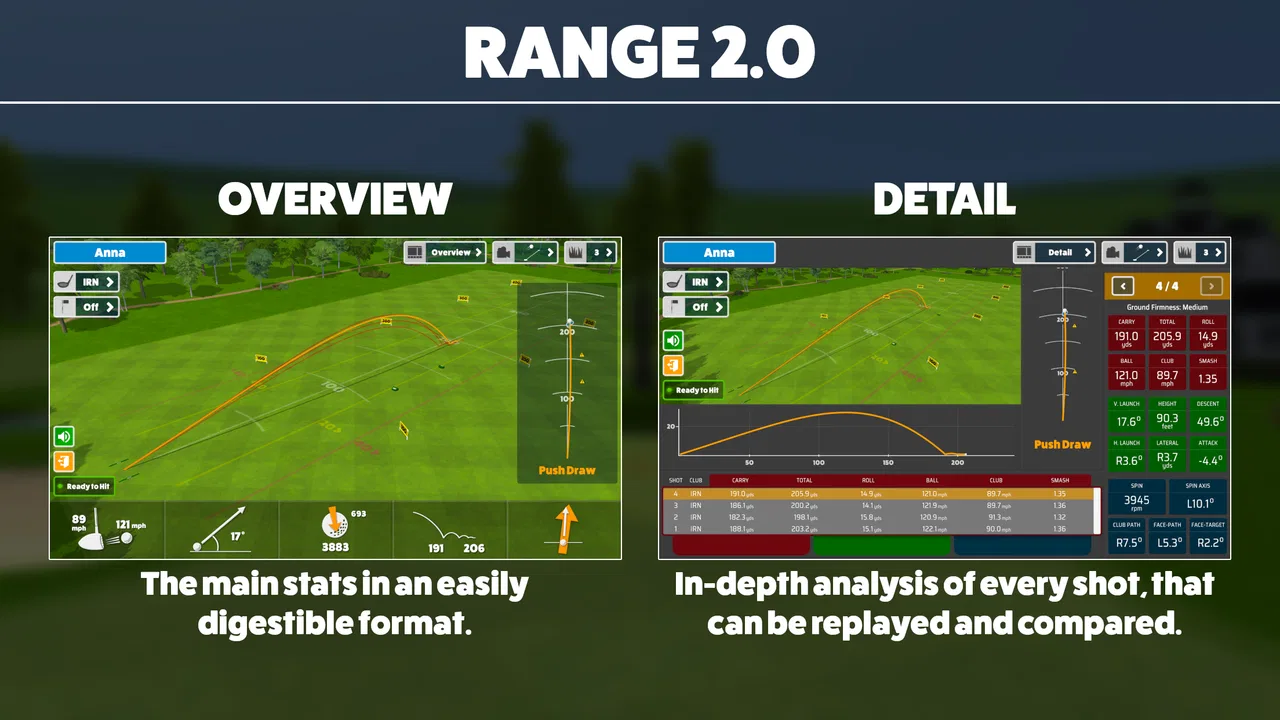
I approached Awesome Golf Simulator as a practical golf companion rather than treating it like a full replacement for a launch monitor or a real practice session. Its purpose is clear: it focuses on tracking swings and shots, then presents that information in a way that can help me understand what happened instead of relying only on feel. That makes it especially interesting for golfers who enjoy reviewing their practice and want more structure than a simple bucket of balls can provide.
The app is free to install, belongs to the sports category, and is developed by Great Detail. It is suitable for Everyone, works on devices running Android 8.0 or later, and has reached over 50 thousand installs. Those details make it approachable for casual golfers, although the presence of in-app purchases ranging from $9.99 to $349.99 per item means I would not assume that every useful part of the experience is included at no cost.
My overall impression is positive but measured. A 4.0 average from around 228 ratings suggests that many users find value in it, while also leaving room for different expectations and occasional friction. I would recommend trying it if you want a golf-focused tracking tool and are willing to spend time learning how to use its feedback. I would not recommend it blindly to someone expecting the same precision, hardware integration, or coaching depth as a dedicated professional setup.
You May Also Like

 AccuWeather: Weather Radar
AccuWeather Review: A Quick, Clear Forecast for Everyday Decisions
For everyday plans, the best forecast is the one you can understand quickly. AccuWeather makes rain timing, radar, and local conditions easy to act on, with a few trade-offs.

 Hill Climb Racing
Why Hill Climb Racing Still Turns Crashes Into One More Run
A tiny car, a bumpy hill and one more upgrade: Hill Climb Racing keeps resurfacing because its simple chaos makes every near-miss feel personal.

 AliExpress - Shopping App
AliExpress Makes Global Shopping Feel Personal, but Shoppers Bear the Risk
AliExpress turns a global marketplace into a pocket-sized discovery engine. Its reach is useful, its shopping loop compelling, and its trade-offs easy to miss.

 Lords Mobile: Kingdom Wars
Lords Mobile Is a Kingdom-Building Routine, Not a Quick Match
A case-by-case verdict on the building, battles, device demands, and social commitments that make Lords Mobile rewarding for some players and exhausting for others.

 PDF Scanner app - TapScanner
TapScanner Makes Paperwork Easier to Capture, Check, and Share
TapScanner makes scanning with a phone feel less like a rescue operation and more like a dependable step in getting work done. Its capture tools are useful, though not flawless.

 Block Blast!
 Shows How Much a Puzzle Game Can Leave Out
A quiet grid game shows why puzzle players increasingly value instant clarity, repeatable skill and low-pressure play—and where the genre still needs to catch up.
More From Our News Desk
View All News


How the current version fits into a golfer’s routine
The current version is 3.10.3, and that matters because the app feels like an established product rather than a first experiment. I see it as something that can sit between casual practice and more serious self-analysis. You can use it when you want to turn a few swings into information, but it still depends on the quality of the setup and on your ability to interpret what you see.
A realistic use case would be an evening practice session after work. Instead of hitting balls without a plan, I could choose one club, make a repeatable set of swings, and review the shot information afterward. The useful part is not simply seeing a number appear. The real benefit comes from comparing similar swings and asking whether a change in tempo, setup, or contact produced a meaningful difference.
That approach is more valuable than chasing a perfect result on every attempt. Golf naturally produces inconsistent shots, and a tracking app can become frustrating if I treat each reading as a final verdict. I get better use from it when I look for patterns across a session. If several swings show a similar tendency, that is more useful than reacting emotionally to one poor ball.
The app’s focus on swing and shot tracking also gives it a narrower identity than a general golf utility. It is not something I would open mainly to browse courses, manage a handicap, or replace every other golf-related tool on my phone. Its strength is concentrated in the practice process: make swings, inspect the outcome, and use that information to decide what to try next.
What the tracking approach does well
The strongest idea here is the connection between movement and result. Many golfers know that a shot felt wrong, but “wrong” is not always specific enough to guide the next attempt. A tracking-focused app can help turn that vague feeling into a more deliberate review. Even when the information does not solve the problem immediately, it can make practice less random.
I also like the possibility of using the app as a personal record of practice habits. Rather than remembering a session inaccurately, I can look back at what I was working on and whether the results seemed to improve during that session. This is particularly useful for golfers who tend to make too many changes at once. A more disciplined workflow is to choose one variable, keep the rest as consistent as possible, and then review the outcome.
There is a subtle advantage in separating practice feedback from the pressure of a round. On the course, I usually need to choose a shot and commit to it. During practice, I can investigate. Awesome Golf Simulator is better suited to that investigative mindset, where I am trying to understand my swing rather than merely record my score.
One practical tip is to begin with a short calibration or setup routine whenever the environment changes. I would keep the phone position, camera angle, lighting, and hitting area as consistent as possible. Even without inventing a particular technical requirement, the general principle is important: tracking results are only as useful as the conditions under which they are captured. Changing several physical variables between swings makes comparisons much harder.
How the experience compares with common alternatives
Compared with a basic video camera, this app offers a more golf-specific way to organize the session. Video lets me inspect a movement with my own eyes, but it can take longer to review and does not automatically turn every clip into an easy comparison. On the other hand, video gives me visual context that a tracking screen may not provide. For a golfer working on posture or club path, using both approaches can be more informative than relying on either one alone.
Compared with a dedicated launch monitor, the trade-off is different. Hardware designed specifically for golf can offer a more specialized measurement experience and may be the better choice for a player who needs highly dependable numbers for equipment fitting, serious practice, or coaching. Awesome Golf Simulator is more attractive when convenience and accessibility matter more than building a professional measurement station.
It also differs from a traditional golf simulator setup. A simulator environment is often chosen for a fuller round-like experience, while this app’s main appeal is the tracking of swings and shots. If I want entertainment, course play, or a visual recreation of a round, another type of product may suit me better. If I want to inspect practice results without committing to a complete simulator installation, this is the more focused option.
The comparison with a paper notebook is surprisingly useful. A notebook is cheap, flexible, and excellent for recording how a swing felt, what club I used, and what I intended to change. It cannot provide digital shot tracking, but it can capture context that numbers alone miss. I would use notes alongside the app when testing a new grip, changing practice goals, or trying to remember how fatigue affected the final part of a session.
Changes and product maturity in version 3.10.3
The presence of version 3.10.3 shows that Great Detail has continued developing the app beyond its original release on March 9, 2022. I would read that as evidence of an ongoing product rather than a one-off release. Still, a version number by itself does not tell me that every part of the experience has been transformed, so I would judge the current build by how reliably it supports my actual practice routine.
For existing users, the most important effect of continued development is usually continuity. A golfer who has already built a habit around tracking does not want to relearn the entire workflow every time the app changes. The current release should be approached as the present version to evaluate, while expectations about future additions should remain expectations rather than promises.
If I were returning after a long break, I would spend one session checking the basics instead of immediately comparing old and new results. I would confirm that the app recognizes my normal setup, that I understand the current presentation of shot information, and that my phone placement is repeatable. This avoids blaming the software for differences caused by a changed environment or a different practice goal.
New users should also resist the temptation to judge the app after a single swing. A tracking tool needs a small body of comparable attempts before it becomes genuinely useful. I would start with one club and one clear question, such as whether a slower takeaway produces more consistent contact. That creates a better test than switching clubs and techniques constantly.
Where the app can still create friction
The first limitation is interpretation. Tracking information can look authoritative, but it does not automatically explain the cause of a poor shot. A golfer may see an undesirable result and respond with a completely unrelated swing change. I would treat the app as an observation tool, not as a replacement for a qualified coach who can watch the whole movement and ask questions about the player’s body, intention, and physical limitations.
There is also a setup burden. Any phone-based tracking workflow can become less enjoyable if positioning the device, maintaining a consistent practice area, or reviewing repeated attempts feels like work. Golfers who want to hit a few balls without recording anything may find the process excessive. The app is most rewarding for people who actually enjoy the review stage.
The free entry point is helpful, but the paid items deserve attention before making the app central to a long-term routine. Individual purchases range from $9.99 to $349.99, which is a very broad span. I would first test the free experience and identify exactly which part of the workflow improves my practice before considering a purchase. A high-priced option can make sense for a committed golfer, but it is difficult to justify if I only practice occasionally or do not review the information afterward.
Another limitation is that numbers can encourage overthinking. Golfers sometimes become so focused on technical feedback that they lose awareness of rhythm, target, and confidence. I would set a limit on analysis: review a group of swings, choose one adjustment, then return to hitting with a clear target. The app should support practice, not turn every shot into a laboratory experiment.
Device compatibility is reasonably approachable because the minimum operating system is Android 8.0, but compatibility alone does not guarantee an identical experience on every phone. Screen size, camera quality, processing performance, and the physical space available for practice can all affect convenience. Before paying for anything, I would test the app on the phone I intend to use and in the exact place where I normally practice.
Who will get the most from it
I think the best audience is the golfer who likes measurable practice but does not want to begin with a costly dedicated setup. Beginners can use it to develop the habit of reviewing shots rather than simply counting how many balls they hit. Intermediate players may appreciate it more because they are often working on specific consistency problems and can create focused practice sessions around them.
It can also suit a golfer who practices alone. Without a friend or coach standing nearby, it is easy to lose track of what changed between swings. A structured tracking routine provides an external reference point. It will not replace another person’s eyes, but it can make solo practice more intentional.
I would be more cautious recommending it to a player who needs official-level measurement for equipment decisions. If a club fitting, coaching plan, or competitive training program depends on highly trusted readings, a purpose-built system may be the better investment. The same applies to someone whose main goal is to play simulated courses rather than study swings and shots.
It is also not ideal for a golfer who dislikes technology during practice. If setting up a phone feels distracting, a simple range session with a notebook and a single technical focus may produce better results. The best tool is the one that helps me practice consistently, not necessarily the one with the most information.
Practical ways to avoid misleading conclusions
I would divide a session into three stages. First, make a few normal swings without trying to fix anything. This gives me a reference for the day. Next, work on one adjustment while keeping the club and setup stable. Finally, return to the original motion and see whether the change actually helped. That last step is important because a temporary improvement during a concentrated drill may not survive a return to a natural swing.
I would also avoid comparing results from completely different conditions as if they were equivalent. A tired evening session, a rushed lunch-break practice, and a relaxed weekend session may produce different outcomes for reasons unrelated to technique. Adding a short note about energy, goal, and club can make the app’s tracking more meaningful over time.
Another non-obvious trade-off is the difference between collecting information and acting on it. More recorded shots do not automatically create better practice. I would rather review a small, purposeful set and make one sensible decision than accumulate a large amount of unexamined feedback. This is where the app can either sharpen my routine or become another source of clutter, depending on how deliberately I use it.
For a beginner, I would keep the language simple and focus on repeatability. For an experienced golfer, I would use the app to test a specific hypothesis, not to search for a perfect swing. That distinction helps prevent the common mistake of changing technique after every imperfect result.
What I would watch before committing further
My main question over continued use would be whether the tracking remains consistent enough to support comparisons across sessions. I would watch for stable results when the phone position and practice conditions are repeated. If the readings vary unpredictably, I would reduce the importance I place on individual values and use the app only for broader trends.
I would also watch how well the current version fits into a complete practice habit. The best sign is not an impressive screen; it is whether I can start a session quickly, understand what I am seeing, and leave with one clear takeaway. If the workflow regularly interrupts my rhythm, the theoretical value of detailed tracking matters less.
The purchase structure is another area I would evaluate carefully. Since the app is free but includes items from $9.99 to $349.99, I would decide based on repeated personal benefit rather than curiosity. A golfer who uses it weekly and can identify specific improvements may view a purchase differently from someone who opens it only once every few months.
Finally, I would keep expectations realistic about product evolution. The release history suggests ongoing attention from Great Detail, and the current version gives users a concrete build to try today. That is encouraging, but I would not choose the app solely for features I hope will arrive later. My decision would rest on whether version 3.10.3 already supports the practice workflow I need.
After using it as a focused training aid, I see Awesome Golf Simulator as a useful middle ground. It is more purposeful than casually filming swings, less demanding than installing a complete simulator environment, and potentially more approachable than starting with specialized hardware. Its value depends heavily on consistent setup, thoughtful interpretation, and a willingness to review practice instead of merely collecting readings.
My recommendation is to try it free first, use one club and one practice goal, and judge the results after several comparable sessions. That approach gives the app a fair test and protects against spending money before I know whether its feedback changes the way I practice. For golfers who want structured swing and shot tracking, it is worth exploring. For those seeking a full virtual golf experience, professional fitting accuracy, or a completely hands-off range companion, a different option will probably be a better match.
In short, I would keep it on my shortlist for deliberate practice, especially if I already enjoy analyzing my swing and want a mobile tool from Great Detail that sits between simple video and dedicated golf hardware. I would use it with clear limits, combine its information with feel and observation, and let actual improvement—not the number of features or the promise of future updates—decide whether it earns a permanent place in my golf routine.
FAQs for Awesome Golf Simulator
01What is Awesome Golf Simulator, and what kind of experience does it offer?
Awesome Golf Simulator is a mobile golf game designed to let players practice and play virtual rounds on a variety of courses. It focuses on realistic-looking environments, shot selection, swing control, and score-based gameplay. Depending on the available mode and device, players may be able to enjoy casual practice, complete challenges, or compete in structured rounds while improving their accuracy and course strategy.
02Is Awesome Golf Simulator suitable for beginners?
Yes, the game can be suitable for beginners, although new players may need some time to understand the controls and timing of each shot. The best approach is to start with practice or easier challenges before attempting more demanding courses. Players should also expect to learn how factors such as club selection, shot strength, direction, and course hazards affect the final result.
03Does Awesome Golf Simulator require an internet connection?
The connection requirements may depend on the feature being used and the version installed on your device. Basic practice or certain single-player content may work without a constant connection, while online competitions, rankings, account synchronization, advertisements, or downloadable course content may require internet access. It is recommended to check the app’s store listing and test the game before relying on offline play.
04Are there in-app purchases or advertisements in Awesome Golf Simulator?
Awesome Golf Simulator may include advertisements, optional purchases, or other monetization features, depending on the platform and current release. These can potentially unlock extra content, remove advertising, provide virtual items, or speed up progression. Before downloading, review the Google Play or App Store listing for the latest pricing details, age rating, and purchase information, especially if children will be using the app.
05What devices are compatible with Awesome Golf Simulator?
Compatibility depends on the operating system, device model, available storage, and the minimum hardware requirements specified by the developer. Newer phones and tablets generally provide smoother graphics and more responsive controls, while older devices may experience slower loading, reduced visual quality, or occasional performance issues. Check the official store page for the current Android or iOS requirements before installing.
Pros
- Realistic swing mechanics make practice sessions feel engaging.
- Multiple courses provide variety for different skill levels.
- Useful for improving timing
- aim
- and club selection.
- Quick rounds work well for short practice sessions.
- Clean visuals make course layouts easy to follow.
Cons
- Accurate swing tracking may require compatible extra equipment.
- Some advanced content may be locked behind in-app purchases.
- Performance can vary on older phones and tablets.
- Outdoor play is less practical in bright sunlight.
- A stable internet connection may be needed for some features.

Awesome Golf Simulator
Gallery